.png?width=2129&height=82&name=Texto%20do%20seu%20par%C3%A1grafo%20(4).png)
In April 2026, LinkedIn introduced changes to how third-party platform integrations work. As a result, a one-time configuration is now required on your LinkedIn Company Page before GeekHunter can automatically publish your job openings.
The setup is quick and must be completed by a Company Page Administrator.
Before You StartPlease make sure you:
- Are logged into LinkedIn with an account that has Administrator access to your Company Page.
- Are accessing the Company Page that will be integrated with GeekHunter.
1. Open your Company Page Settings
From your LinkedIn Company Page:
- Go to Settings.
- Click Job Posting.
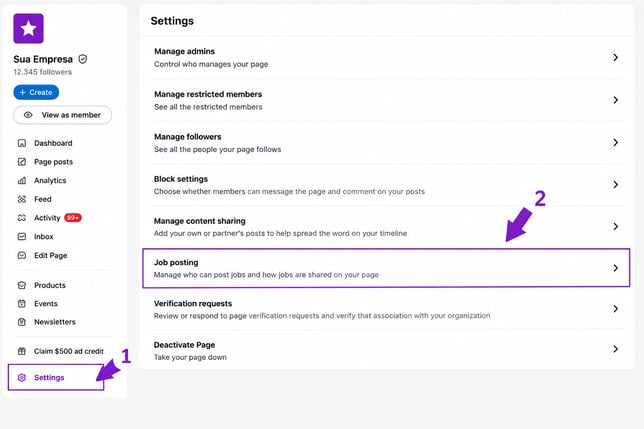
2. Add GeekHunter's domains
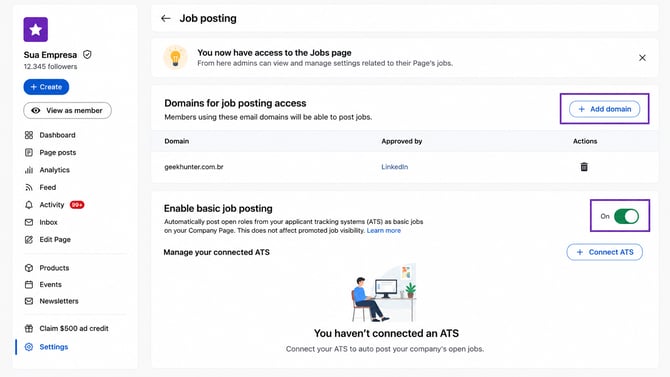
Under the authorized domains section, add the following domains:
geekhunter.com.brgeekhunter.com
3. Enable Basic Job Posting
On the same page, make sure the Basic Job Posting option is enabled.
This setting is required for LinkedIn to allow GeekHunter to automatically publish your job openings.
Final Step: Send Us a Confirmation
Once you've completed the configuration:
- Take a screenshot showing:
- The domains
geekhunter.com.brandgeekhunter.comadded. - The Basic Job Posting option enabled.
- The domains
- Send the screenshot to suporte@geekhunter.com.br.
Once we receive your confirmation, we'll complete the integration on our side. After that, your jobs will be ready to be published automatically on LinkedIn.
Need Help?If you have any questions or need assistance during the setup process, feel free to contact our Support team at suporte@geekhunter.com.br. We'll be happy to help.